What is a Network Hard Drive and How Does It Work?
In recent years, the demand for efficient data storage solutions has surged. A Network Hard Drive (NHD) plays a crucial role in this landscape. According to a report by Market Research Future, the global network attached storage market is projected to reach $25 billion by 2026, showcasing a growing reliance on network hard drives. Experts emphasize their significance in both businesses and households, as they enable simultaneous access to files across multiple devices.
Renowned IT specialist Dr. Emily Larson states, “A Network Hard Drive is essential for seamless file management and collaboration in the digital age.” This highlights the critical role of NHDs in fostering productivity. Users must be aware, however, that managing an NHD requires attention. Technical issues can arise, and security vulnerabilities may pose risks if not addressed properly.
While Network Hard Drives offer unparalleled convenience, they also demand a reflection on data management practices. Incorrect configurations or neglecting updates can result in data loss. Thus, understanding how these devices function is vital for users. By ensuring effective use of NHDs, individuals and organizations can optimize their storage solutions and stay ahead in the digital era.

What is a Network Hard Drive?
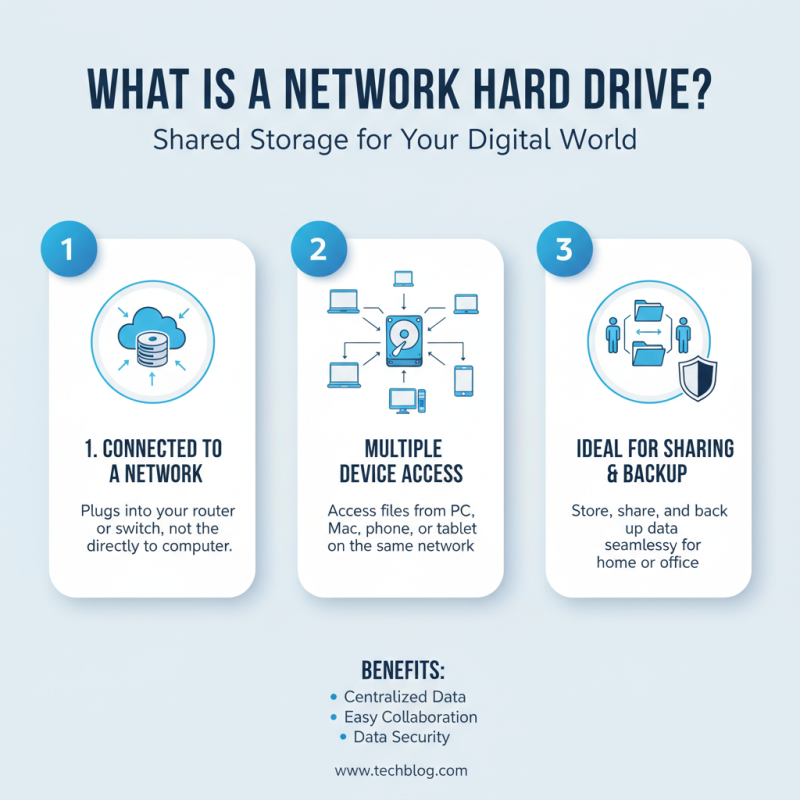
A network hard drive is a storage device connected to a network. Unlike traditional hard drives, which connect directly to a computer, network hard drives can be accessed by multiple devices. This makes them ideal for both personal and business use. Users can store files, backup data, and share documents seamlessly among various users on the same network.
Setting up a network hard drive typically involves connecting it to your router. Once configured, users can access it via their computers, smartphones, or tablets. This accessibility is a great advantage, but it can also raise security concerns. Users must ensure that proper security measures are in place. It’s important to create strong passwords and regularly update your network settings. Also, the network’s performance can vary, depending on the number of users and the type of content being accessed.
Not all network hard drives operate the same way. Some may offer cloud-like features, allowing access from anywhere with an internet connection. Others may excel in file-sharing capabilities but lack advanced functionalities. It can be frustrating to navigate through these options. Researching your specific needs is crucial. Consider how you plan to use the drive and the devices you will connect. This way, you can make a more informed decision when selecting a suitable network hard drive.
Key Features of Network Hard Drives
Network hard drives are powerful tools that enhance data storage and access for multiple users.
One key feature is centralized storage. This means all files reside in one location. Users can access these files from various devices,
whether a laptop or a smartphone. This accessibility fosters collaboration, especially in office settings.
Another important aspect is data redundancy. Many network hard drives offer RAID configurations.
These allow for duplicate copies of data, protecting against loss. If one hard drive fails, the information remains safe on another. However, users must understand that RAID does not replace regular backups.
It serves as an additional layer of security, but it’s not infallible.
Additionally, network hard drives provide robust sharing options. Users can set permissions to control who accesses specific files.
This feature is vital for maintaining privacy and security within a network. However, managing these permissions can sometimes be cumbersome.
Users may find themselves questioning whether they granted proper access or inadvertently shared sensitive data.
These considerations highlight the importance of understanding both the capabilities and limitations of network hard drives.
How Network Hard Drives Connect to Networks
Network hard drives are a crucial component in modern data storage solutions. They connect to local networks, allowing multiple users to access and share data. This access is typically through Wi-Fi or Ethernet cables. The setup can include routers, switches, and network-attached storage (NAS) components.
To connect to a network, these hard drives use an IP address. Once online, they become visible to all connected devices. Users can map them to their computers, creating a seamless experience. This setup facilitates file sharing and collaborative work. Yet, the initial setup can be challenging for some users. Misconfigurations may lead to connectivity issues or decreased performance.
Network hard drives also support various protocols, such as SMB and NFS. These allow different operating systems to communicate effectively. Despite their advantages, not all users fully understand these protocols. Some may struggle with the complexities of permissions and user management. This often leads to data security concerns. When configuring, it’s vital to pay attention to these details.
Network Hard Drives Usage Statistics (2023)
This bar chart represents the distribution of network hard drive usage among different user categories in 2023. Home users comprise the largest segment, reflecting the growing trend of personal cloud storage solutions. Small businesses follow, highlighting their need for efficient data storage and sharing options.
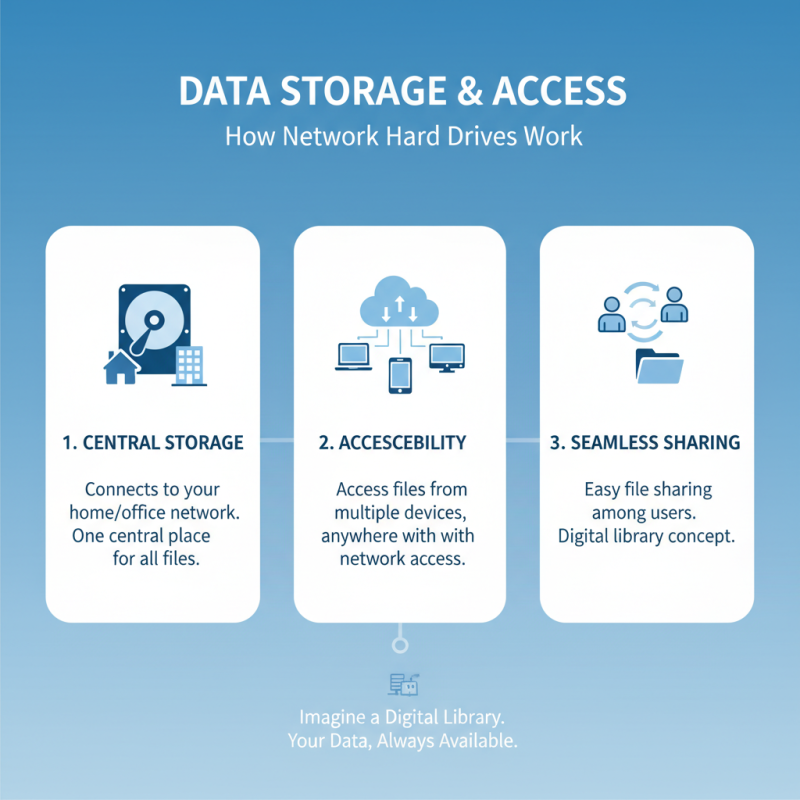
Data Storage and Access: How Network Hard Drives Work
Network hard drives serve as central storage solutions for both individuals and organizations. They connect to your home or office network, making files accessible from multiple devices. This functionality allows for seamless sharing among users. Imagine a digital library where everyone can access books without needing to be in the same room.
Understanding how these devices work is essential. Network hard drives use various protocols to communicate over the network. For instance, they often utilize TCP/IP for data transfer. This means your documents, photos, and videos are securely stored but easily retrievable from any connected device. The experience can vary depending on the network setup. Sometimes, data retrieval might be slower due to bandwidth limitations.
Moreover, not all network configurations are perfect. Users may face challenges like connectivity issues or drive failures. Regular maintenance is crucial to ensure optimal performance. It's a learning journey—identifying needs and adjusting setups can lead to better experiences. The balance of convenience and reliability often requires attention and adjustment.
Benefits of Using a Network Hard Drive for Data Management
Using a network hard drive (NHD) for data management offers distinct advantages for individuals and businesses alike. One of the primary benefits is
centralized storage. With an NHD, multiple users can access data from different locations. According to a report from the
International Data Corporation, organizations that utilize centralized storage solutions can reduce data retrieval times by up to
50%. This improvement enhances efficiency in teamwork and project collaboration.
Furthermore, NHDs contribute to better data security. Many systems allow for encryption and secure access protocols, protecting sensitive information.
A survey conducted by the Ponemon Institute revealed that businesses using networked storage solutions experience
30% fewer incidents of data breaches. This reduction in risk is crucial as companies face increasing threats from cyber attacks.
Cost-effectiveness is another benefit. NHDs minimize the need for physical storage devices, reducing hardware expenditures. According to a report by
Gartner, businesses can save up to
20% on storage costs by transitioning to network-based systems. However, organizations must ensure they have a reliable backup strategy, as technical failures can occur.
Thus, a detailed plan is essential for safeguarding crucial data.